


Magento is one of the most powerful and flexible e-сommerce platforms, which makes it a perfect choice for big websites. Still, being scalable enough to cater to the needs of big businesses, Magento also needs careful maintenance and optimization; without it, a site may end up with poor performance, resulting in lost conversions and profits.
To help you out and identify the most common Magento performance bottlenecks, we have analyzed 30+ Magento stores across different industries, regions, and traffic levels. This report may also let you compare your site with some of the big names and maybe get happier if your site performs better.
A little spoiler: most of the Magento websites we’ve scanned have performance scores of average and lower, but there are some really good, almost perfect ones.
Magento Websites’ Performance Key Stats
Some maths here. We have scanned 31 Magento websites to analyze and evaluate them under a wide set of criteria, such as overall performance optimization, Lighthouse metrics, page structure, Core Web Vitals, speed, SEO, etc. To do that, we’ve used GTmetrix – in addition to the detailed analyses, it gives each site a general score from A (perfect) to F (absolutely terrible, go get your site fixed right now).
Based on the results of this big Magento website health assessment, we can share some interesting stats:
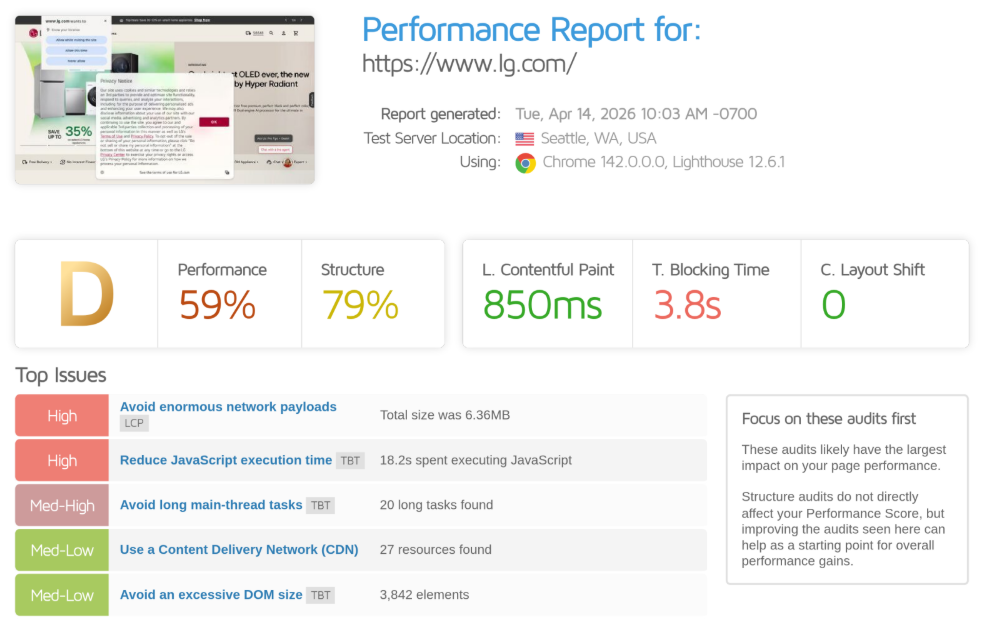
The most common score for Magento websites is D – 35.5% of the analyzed websites perform in this range. Second place take C websites – 25.8%. B is third – 19%. These numbers show that most of the websites on Magento don’t operate in their full capacity, suffering performance lags of different severity.
Only one website from the analyzed group got an A score.
The average Magento website performance score is 60.97%. The best score we have seen during this research is 95%, the lowest is 26%.
Average page loading time is 12.34 seconds. The fastest page took 2.3 seconds to load, the slowest – 38.6 seconds. It’s interesting though that the fastest page didn’t get the best overall assessment score.
The average Total Blocking Time (TBT) is 1.22 seconds, which is way too much (a good score is below 150 milliseconds).
The most common issues are related to TBT – they are noticed on 80.65% of Magento websites.
74.19% of Magento websites face enormous network payloads.
61.29% of Magento websites have excessive JavaScript that takes a long time to execute.
Magento Websites’ Health General Overview
Overall, the state of Magento websites’ speed and performance is average or worse, like here:
Yet some websites show really good Magento health results:
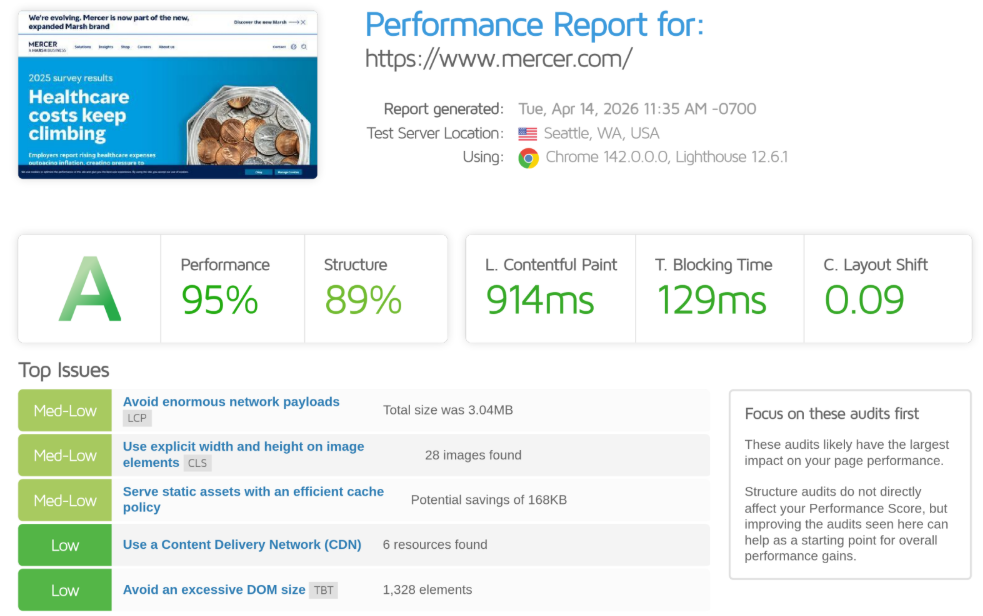
This clearly shows that Magento websites have all the potential to perform their best, so the common misconception that Magento speed is slow by default and cannot be optimized cracks up.
Most of the problems the websites face are not even related directly to Magento as a platform but to excessive, unproven usage of custom or (and) third-party JavaScript and unoptimized visual elements like images, videos, CSS, fonts, etc.
Top Issues on Magento Websites
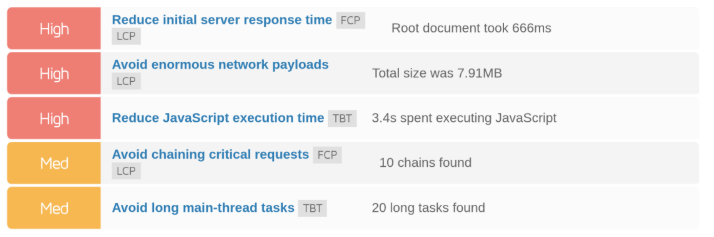
Enormous Network Payloads
Enormous network payloads mean that a page loads too much data before users can comfortably interact with it. In Magento stores, this usually happens because of heavy images, excessive JavaScript, large CSS files, custom themes, fonts, videos, and multiple third-party tools working all at once. As a result, users wait longer, mobile performance drops, and conversions may suffer before the page even has a chance to impress.
Long JavaScript Execution Time
Long JavaScript execution time is one of the most common reasons Magento pages feel slow even after they visually appear to be loaded. This issue often comes from overloaded themes, too many extensions, tracking scripts, sliders, pop-ups, and other frontend elements that rely heavily on JavaScript. In the end, shoppers may face delayed clicks, frozen buttons, and a generally frustrating experience.
Long Main-thread Tasks
Long main-thread tasks happen when the browser is too busy handling heavy operations, such as parsing scripts, rendering layouts, or processing complex page elements. Since the main thread is responsible for user interactions, anything that blocks it can make the website feel unresponsive. Even a visually attractive page can feel broken if users click, scroll, or tap and nothing happens right away.
Lazy-loading LCP Images
Lazy-loading LCP images sounds like a good optimization, but it can backfire when applied to the most important above-the-fold visuals. If the main banner, product image, or hero block is delayed, the page’s Largest Contentful Paint takes longer to complete. This makes the store feel slower from the user’s point of view and can hurt Core Web Vitals. Lazy loading is useful for below-the-fold images, but the key visual content users see first should usually load with priority.
Not Using a CDN
Not using a CDN means that all users receive website assets from the same server, no matter where they are located. For Magento stores with international traffic, this can create noticeable delays, especially for images, scripts, and static content. A CDN helps deliver these assets from servers closer to the customer, reducing latency and improving load speed. Without it, even a well-optimized store can perform poorly for users outside the main hosting region.
Multiple Redirects
Multiple redirects add extra steps before a user finally reaches the intended page. This often happens because of old URLs, HTTP-to-HTTPS chains, trailing slash inconsistencies, or outdated redirect rules left after migrations and redesigns. Each redirect may seem small, but together they create avoidable delays. For both users and search engines, clean and direct URLs are always better than a long chain of detours.
Large Layout Shifts
Large layout shifts occur when page elements move unexpectedly while the page is loading. This can happen when images do not have set dimensions, fonts load late, banners appear suddenly, or dynamic blocks push content down. For users, it is especially annoying: they may try to click a button, but the page shifts and they hit something else. Besides hurting user experience, layout shifts also damage CLS scores, one of Google’s Core Web Vitals metrics.
Render-blocking Resources
Render-blocking resources are files that stop the browser from displaying page content until they are fully loaded and processed. In Magento, this often comes from heavy CSS, synchronous JavaScript, third-party scripts, or themes that load too many assets too early. The result is a blank or half-loaded page that keeps users waiting. Reducing render-blocking resources helps content appear faster and makes the store feel much more responsive.
Critical Request Chaining
Critical request chaining happens when important resources depend on other resources and have to load one after another. For example, the browser may need to download CSS before discovering a font, or load one script before another can run. These chains slow down the critical rendering path and delay visible content. In Magento stores, this often points to inefficient asset loading, theme structure, or unnecessary dependencies.
Long Server Response Time
Long server response time means the server takes too long to start sending the page to the browser. This may be caused by weak hosting, slow database queries, lack of caching, overloaded extensions, or inefficient backend configuration. No matter how optimized the frontend is, a slow server response delays everything that comes after it. For Magento stores, improving TTFB is often one of the most important steps toward better overall performance.
Magento Site Health Best Practices
Optimize and Compress CSS, JavaScript, and Images
Keep your page size under control by compressing images, using modern formats like WebP or AVIF, and removing unnecessary media files. The same goes for CSS and JavaScript. A lighter page always loads faster.
Reduce JavaScript Usage and Execution
Audit all scripts running on your store and remove anything that doesn’t directly contribute to the user experience or conversions. Replace heavy libraries with lightweight alternatives, and defer or delay non-critical JavaScript.
Avoid Blocking the Main Thread
Break down large tasks into smaller chunks and prioritize critical rendering tasks. This often means optimizing scripts, simplifying layouts, and reducing complex frontend logic. A responsive page reacts instantly when users interact with it.
Prioritize Above-the-Fold Content
Make sure the most important visible elements load first. Avoid lazy-loading key images that appear immediately when the page opens. Instead, preload critical assets and ensure your Largest Contentful Paint happens as quickly as possible.
Use a Content Delivery Network (CDN)
Distribute your static content through a CDN to ensure faster delivery regardless of user location. This reduces latency, improves load times globally, and takes pressure off your main server.
Eliminate Unnecessary Redirects
Keep your URL structure clean and direct. Audit your site for redirect chains and remove redundant ones, especially those created during migrations or SEO updates. Each unnecessary redirect slows down both users and search engines.
Stabilize Layout During Load
Always define dimensions for images, banners, and dynamic elements to prevent unexpected layout shifts. Avoid injecting content above existing elements. A stable layout improves both usability and Core Web Vitals.
Minimize Render-Blocking Resources
Load only critical CSS upfront and defer the rest. Use asynchronous or deferred loading for JavaScript wherever possible. This allows the browser to render visible content faster, rather than waiting for all resources to finish loading.
Simplify Resource Loading
Reduce dependencies between files so resources can load in parallel rather than sequentially. Combine files where appropriate, preload key assets, and review how your theme and extensions load scripts and styles.
Improve Server Response Time
Invest in reliable hosting, enable full-page caching, and optimize your database performance. Upgrade to the latest supported PHP version and ensure your server configuration is tuned for Magento.
Control Extension Usage
Be selective with third-party modules – choose trusted providers. Poorly optimized extensions are one of the biggest hidden performance killers in Magento stores.
Test Your Magento Website
To see whether your Magento website has any of these (or other) performance, speed, or SEO issues marked in red or orange, feel free to scan it with GTmetrix. Evaluate the key performance metrics and learn if your website can perform at a better capacity.
Magento websites can perform really well and bring you more traffic and conversions if you pay enough attention to the website’s health. Amasty’s Magento Performance Audit will help you identify the real causes behind these issues before they start affecting revenue and user experience.
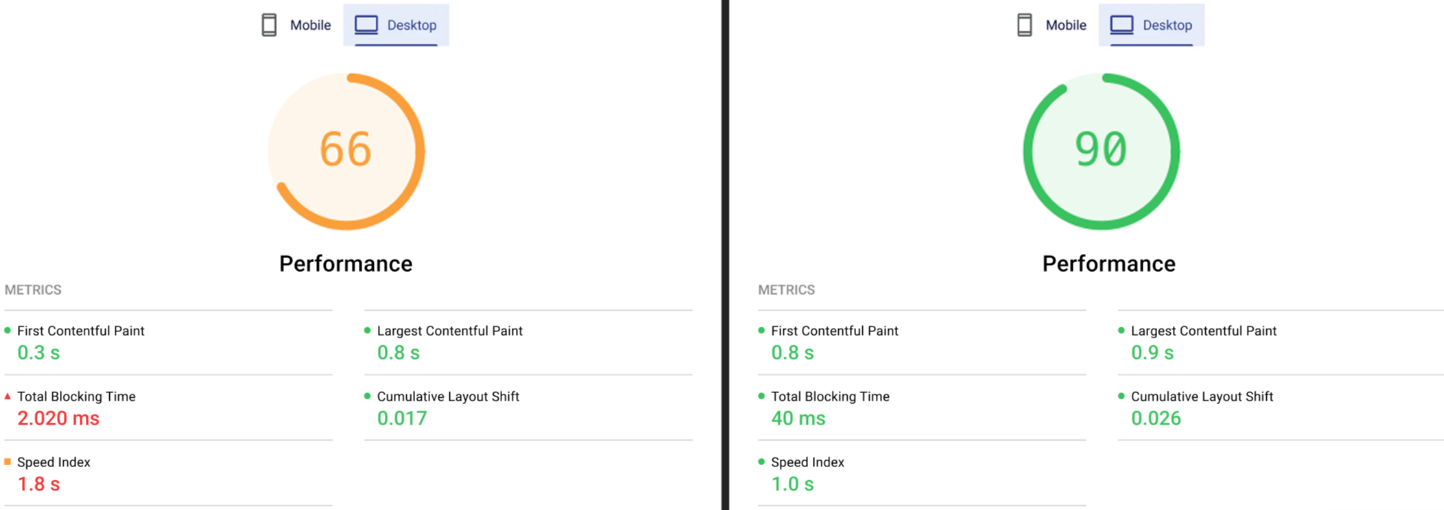
This is the result of the same page before and after our Magento Performance Audit.
Contact our professionals to make your website powerful, healthy, and fast.